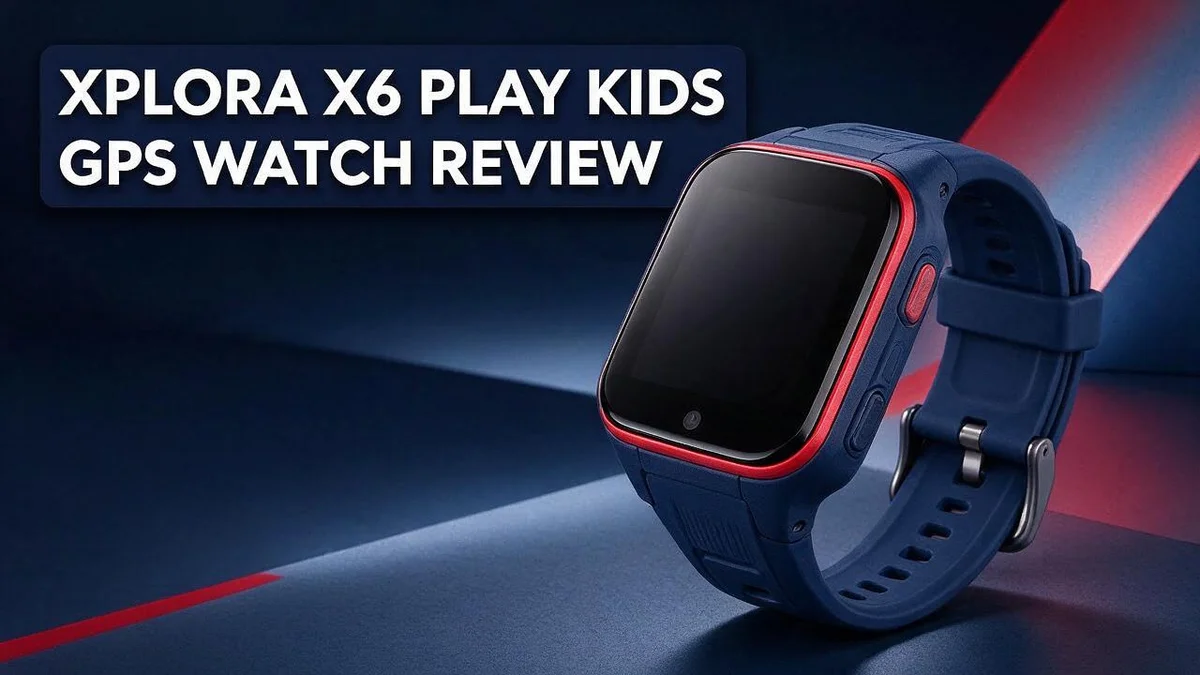
Xplora X6 Play Kids GPS Watch Review: The Ultimate Guide
Every parent wants to know their child is safe, whether they are at school or at the park. The Xplora X6 Play offers a simple way to stay connected. This 4G watch is made for kids ages 4 to 12, and it works without a smartphone.
Live GPS tracking shows where your child is at any moment. A dedicated SOS button helps kids reach you fast when they need help. You can also set safe zones and receive alerts when your child moves beyond them.
Kids can call and message approved contacts using the microphone and touchscreen. The watch also includes a camera and a pedometer for everyday fun. In this review, we look at how it works, what it does well, and whether it suits your family.
In a Nutshell
-
Built for young kids: The Xplora X6 Play is a 4G phone watch made for children aged 4 to 12. Its silicone build suits busy days of play and movement.
-
A newer model: This watch is the successor to the X5 Play. Families who liked the earlier model can see what has changed.
-
Quick help button: A dedicated SOS button lets kids ask for help fast when they need it most. Parents can feel more at ease knowing that option is always there.
-
Safe zones: Geofencing lets you set safe zones like home or school. You can see when your child moves outside those areas.
-
Works alone: The watch works without a smartphone. Kids can wear it on their own, so there is no need to hand over a phone.
-
Check the details: Some listings say the case is plastic, and some say the watch is water resistant instead of waterproof. Read the product specs before you decide.
Real-Time GPS Tracking and Geofencing

Last update on 2026-11-12 / Affiliate links / Images from Amazon Product Advertising API
Real time tracking works best when it fits your daily routine. Many parents check the map during school drop off or after practice ends.
Geofencing can cover more than home and school. Think about the bus stop, a friend’s house, or the soccer field. Each zone shows you when your child arrives or leaves.
Your child’s week often includes several stops. Map those places before you set up any zones.
Zones can change as your child grows. New schools, clubs, or friends bring new routes. Update your map so it matches real life.
Talk with your child before you turn on tracking. Kids handle new tech better when they know the reason behind it.
Explain that the map helps you find them quickly. This message feels caring, not controlling. Kids who understand the purpose often feel safer too.
Tracking also supports independence. Kids who walk home from school can build confidence while you keep an eye on their route.
A map view also helps during emergencies. When your child presses the SOS button, you can check the location right away.
Trusted adults can help during busy pickup times. Make sure they know the zones and the routine.
Plan for days when schedules change. Field trips, sports games, and sleepovers all shift the usual pattern. A quick zone update keeps everyone on the same page.
Keep the watch charged every day. Tracking only works when the device has power. Make charging part of the bedtime routine.
Keep a backup plan ready. If the map shows an odd location, call the school or a trusted contact. Quick action beats guessing.
GPS signals can drift near tall buildings or indoors. A location might look a little off at times. Stay calm and check again.
Review your settings every few months. Adjust zones and check that contacts still match your family plans.
Small habits make tracking more useful. Combine zones, open talks, and regular updates. Your child gets freedom, and you get peace of mind.
Comfort and Build for Young Wearers
A watch only helps when your child actually wears it. Comfort matters just as much as features. Young wrists are small, and a band that feels loose or tight can cause fast frustration.
Kids move a lot all day. They run, climb, and swing on playground bars. A watch that feels light stays out of the way. Children forget about it during play, which is exactly what parents want.
Start with the strap. A soft band feels gentle on delicate skin and sits comfortably through a long school day. Check that the closure stays secure so the watch does not slip off at recess.
Children grow fast, so fit changes over time. Look for easy adjustments. A band that loosens or tightens without hassle keeps the watch comfortable for longer.
Build quality matters on rough days too. Kids drop things, bump doorframes, and splash through puddles. Solid construction handles these moments with less worry.
Think about materials that touch skin all day. Soft surfaces feel kinder during hot afternoons and sweaty recess games. Parents can also wipe the band with a damp cloth to keep it fresh.
Simple layouts help small hands too. Clear icons and easy screens reduce confusion during the day. A child who understands the watch feels more confident using it.
Let your child try it on before daily use. Watch how it sits during play, homework, and bedtime. A comfortable watch feels like part of the outfit, not a chore.
Night time also matters. Some kids sleep with their watch on, so comfort during rest is important. A light, smooth feel helps them forget it is there.
Ask your child what feels good. Kids often notice details that adults miss, like a band that pinches or a clasp that scratches. Their feedback helps you pick the best fit.
Comfort also builds trust. When kids like their watch, they wear it more often. Steady wear gives parents a clearer daily routine. Happy kids keep their watch on longer.
Parental Controls and Approved Contacts
Your child should only talk with people you trust. The parent app lets you decide who can reach the watch. Only approved contacts can call or message your child.
Start with a small list of family members. Add grandparents, aunts, uncles, and a few close friends. Keep the list short so your child can remember every name.
Every new contact needs your approval first. This step gives you a chance to check each name. Confirm each number belongs to the right person before saving it.
Talk with your child about the list. Ask who they want to call most. Explain why some people are not on it yet. This talk builds good habits about safe contact.
Review the contacts often. Friends change, and school routines shift. A quick check every month keeps the list current. Remove anyone who no longer needs access.
Think about school days too. Teachers and bus drivers may need a number. Add them only if they help with pickups or emergencies. Keep personal numbers off the list.
Kids may ask to add new friends. Make it clear that only you can approve new names. Ask your child to tell you about any new request right away.
Explain the rules in simple words. Tell your child to answer calls from approved names only. Tell them to come to you if an unknown person tries to reach them. Kids feel safer when they know the plan.
Teach your child what to do with a strange call. Hang up and tell a parent right away. Practice this with a quick role play at home. Practice makes the plan feel natural.
Parental controls also help you feel calm at work. You can see who is in the contact list at any time. Peace of mind matters on busy days.
Open talks work best with these controls. Ask your child how the watch feels to use. Listen to their ideas and adjust the list together. Trust grows when kids share their side.
Top 3 Alternatives
Gabb Watch 3

Last update on 2026-11-12 / Affiliate links / Images from Amazon Product Advertising API
The Gabb Watch 3 suits parents who want simple, safe tools for daily life. It offers GPS tracking and calling with approved contacts only. Kids cannot browse social media or open extra apps, so screen time stays low. Parents can check locations at any moment from a phone. The watch feels light and comfortable for school days and weekend play.
Verizon Gizmo Watch 3

Last update on 2026-11-12 / Affiliate links / Images from Amazon Product Advertising API
The Verizon Gizmo Watch 3 works well for families already on a Verizon plan. It gives kids calls, texts, and location updates. Parents can set safe zones and get alerts when their child arrives at school or leaves home.
This option fits busy households that need reliable contact throughout the day. Many parents like the school focused features that limit distractions during class hours.
Garmin Bounce 2

Last update on 2026-11-12 / Affiliate links / Images from Amazon Product Advertising API
The Garmin Bounce 2 focuses on outdoor fun and active kids. It uses LTE and GPS to track movement on bike rides, playdates, and trips to the park. Families manage the watch through the Garmin Family app.
Kids can also send quick messages and call saved contacts. The watch handles splashes and rain well, so it survives busy playtime.
Before you decide, think about your child’s age, your phone plan, and how much screen time you want. The right watch keeps your child connected and helps you feel calm about their whereabouts.
Setup and Everyday Use
Setting up the watch takes only a short time. Charge the watch fully before the first use. This gives your child a good start on day one.
Next, follow the steps in the quick start guide. Turn the watch on and connect it to the parent app. Keep your phone nearby during this step.
Take a few minutes to test the SOS button together. Show your child where it sits and what it does. Practice helps them stay calm if they need help.
Make a simple daily charging habit. Place the watch on its charger each night while your child sleeps. A steady routine keeps the watch ready for school.
Check the battery level before school drop off. A quick glance at the screen prevents surprises. Low power can mean missed check ins during the day.
Pick one spot at home for the charger. Choose a place near the bedroom door or the kitchen counter. Visible spots help everyone remember the habit.
Plan a weekly review with your child. Look at how the watch works during the week. Ask what felt easy and what felt confusing.
Watch for small wear signs each week. Check the strap, the buttons, and the screen. Quick checks catch problems before they grow.
Store the charger somewhere safe and dry, away from water and heat. Keep the cable away from pets and little hands. Good care extends the life of the watch.
Update the watch when the app shows a new version. Updates often bring fixes and better features. Keep the app current on your phone too.
Set a reminder on your own phone for Sunday night. Reminders make the habit stick for busy parents. A small nudge keeps the routine on track all week.
With these simple steps, setup feels smooth. Everyday use becomes a normal part of family life. Your child learns that the watch is a helpful tool, not a burden.
Pros and Cons
Pros
– Live GPS tracking shows where your child is right now.
– Safe zones alert you when your child enters or leaves set areas.
– The SOS button gives your child a quick way to reach you.
– It works with 4G and does not need a smartphone.
– Built-in camera and pedometer apps add fun for active kids.
Cons
– The watch is made for ages 4 to 12, so older kids may outgrow it.
– Listings disagree on the case material, so check the spec sheet before buying.
– Water protection is described as both waterproof and water resistant, so confirm the exact rating.
– Independent reviews are limited, so read recent owner feedback before you decide.
Who Should Buy It
Many parents wonder if a watch makes sense before a full phone. This device suits families who want a gentle first step.
Parents who want a phone free start will find it helpful. A watch lets a child make calls without scrolling, texting, or browsing the web.
Kids in the early grades often walk to a bus stop or a friend’s house. A watch gives them a simple way to stay connected during short trips.
Families with more than one caregiver can also benefit. Grandparents, aunts, uncles, or trusted neighbors can join the approved list, so everyone stays in the loop.
Busy households with shared pickup duties may find this useful. Each adult can check in on the child without waiting for the other parent to call first.
It also fits children who love independence. They can feel grown up while parents keep a steady eye on daily routines.
Kids who already use a tablet may see the watch as a smaller step. Its focus stays on calls, contacts, and location, which keeps daily use simple.
This watch is not the best pick for everyone. Teens and kids who want messaging apps or social media will likely need a different device. Families who want a full smartphone experience should look elsewhere.
Your family routine matters most. Look at school hours, after school plans, and weekend trips to see if the watch fits your week.
Still, the watch works well for families who want clear limits. Parents who value simple tools and calm routines often feel more at ease with this option.
Final Verdict
The Xplora X6 Play is a good choice for families who want a simple kids GPS watch. It focuses on safety rather than games or social media.
The approved contacts list is the standout feature. Your child can only reach people you choose. Strangers cannot slip through, so you keep real control.
Think of it as a safety tool first. It does not replace a full smartphone for older kids. It works best for younger children who need a reliable way to reach home.
Trust grows when rules are clear. Talk with your child about where they may go, when they should call, and who can pick them up. The watch supports those talks.
Compare it with other options before you buy. The XGO3 and COSMO JrTrack 4/5 are common rivals. Garmin Bounce, TickTalk 5, Gabb, and Verizon Gizmo also appear on many shortlists.
Each rival offers different strengths. Look at how your child spends the day, then match those needs to the feature list.
The X6 Play suits kids ages 4 to 12 who walk to school or visit friends. It may feel too young for teens who want messaging apps.
Your family routine matters most. Think about pickup times, after school plans, and how often your child goes out alone. A watch fits best when it solves a real daily problem.
Revisit the choice every school year. Kids grow fast, and a watch that fits a six year old may feel different at ten.
Our overall take is positive. The watch covers the core needs of location tracking, SOS help, and safe zones. Still, read recent owner reviews, since independent testing is limited. Use the watch as one part of a wider family safety plan.
If safety and simple communication top your list, this watch deserves a close look. If your child wants social features, a different device may fit better.
Frequently Asked Questions
Will my child stand out at school with this watch?
Some kids may notice it at first. Talk with your child about why the watch matters. When your child understands it as a helpful tool, it feels less like a toy.
Should I check school rules before my child wears it?
Yes, always check your school policy first. Many schools have rules about wearable devices. A quick email to the teacher can prevent problems on the first day.
How can I test the watch before school starts?
Let your child wear it at home for a few days. Watch for comfort issues, and see whether small hands can use the touchscreen and buttons with ease.
What happens if the watch runs low on power?
Make charging part of the bedtime routine. A charged watch keeps your child reachable on the morning walk to school.
How does the X6 Play compare with rivals like Gabb or XGO3?
Each brand offers different features. Compare the GPS tools, the SOS feature, and the watch design side by side. Read recent owner feedback from several sources before you choose.

Hi, I’m Lucy Jones, a dedicated watch enthusiast and reviewer. I spend my time hunting down, testing, and evaluating the most intriguing wristwatches on the market. My goal is to guide you through the overwhelming choices with honest, hands-on insights into every timepiece.