How to Prevent Smartwatch Batteries From Overheating During Wireless Charging?
Does your smartwatch feel like a tiny hot plate every time you place it on the charger? You are not alone. Thousands of smartwatch owners report that their devices get uncomfortably warm or even stop charging because of excess heat.
Wireless charging generates heat by nature. Energy transfers between two coils through electromagnetic induction, and some of that energy converts into heat instead of stored power.
The problem goes beyond discomfort. Prolonged exposure to temperatures above 45°C can shorten your battery’s lifespan by 20% to 30% per year.
In a Nutshell
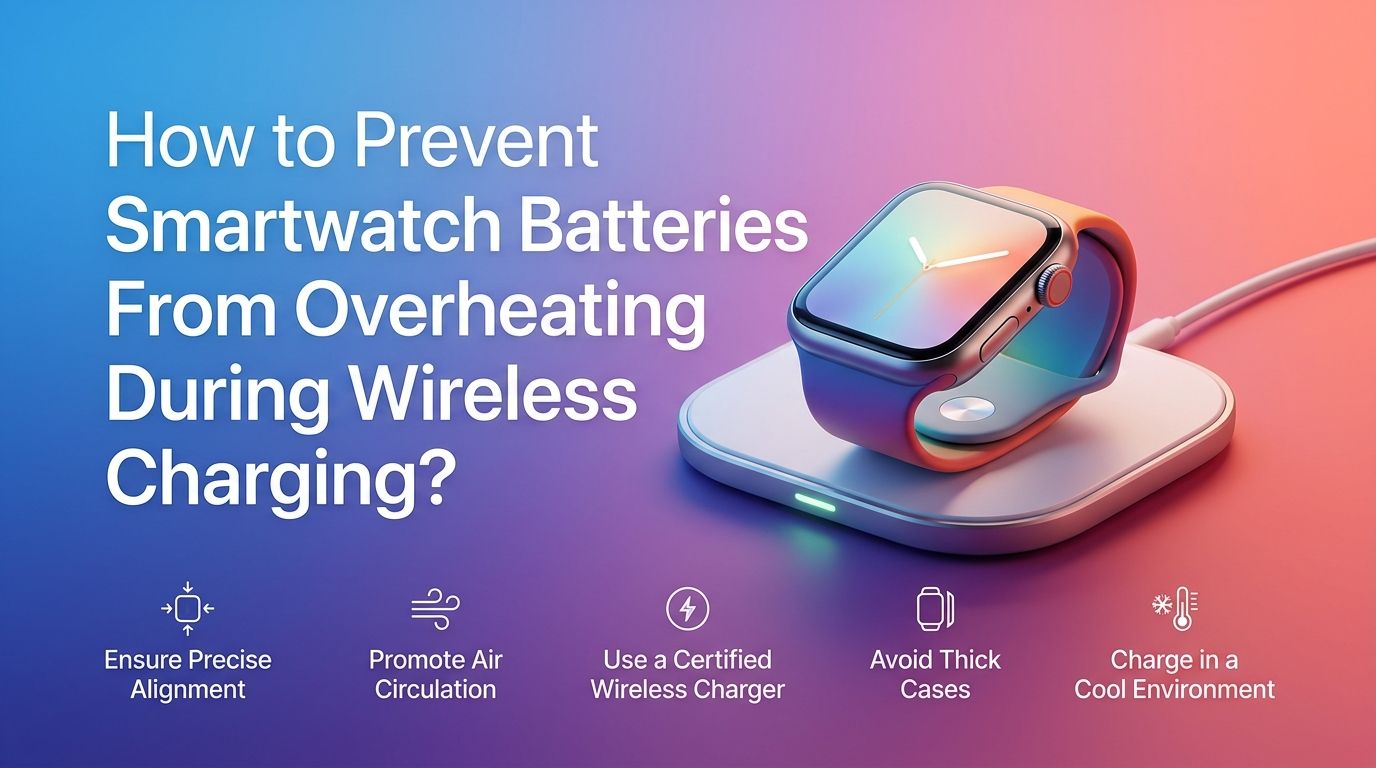
- Use only the official or certified charger that came with your smartwatch. Third party chargers often lack proper voltage regulation and thermal safeguards, which leads to excess heat during charging. A mismatched charger can deliver inconsistent power that stresses your battery.
- Keep your smartwatch and charger on a hard, flat, well ventilated surface. Soft surfaces like pillows, couches, and blankets trap heat around the device. Good airflow around the charger allows heat to escape naturally and keeps the battery within safe temperature limits.
- Ensure proper alignment between your smartwatch and the charging pad. Misaligned coils force the charger to work harder, which increases energy waste and heat output. Most smartwatch chargers use magnets to guide placement, so let them snap into position on their own.
- Remove any protective case or cover before placing your smartwatch on the charger. Cases act as insulation. They block heat from leaving the watch body and can also interfere with the magnetic connection between the charging coils.
- Update your smartwatch firmware regularly. Manufacturers release software patches that improve power management and charging efficiency. A firmware update from Samsung, for example, directly addressed overheating during wireless charging on several Galaxy Watch models.
- Avoid charging your smartwatch in hot environments or in direct sunlight. Ambient temperature plays a big role in how hot your watch gets during charging. A room temperature between 15°C and 25°C (59°F to 77°F) is ideal for safe and efficient charging.
Why Does Your Smartwatch Overheat During Wireless Charging?
Wireless charging relies on electromagnetic induction. A coil inside the charger creates a magnetic field, and a matching coil inside your smartwatch converts that field into electrical current. This process is less efficient than wired charging and wastes roughly 30% to 50% more energy, mostly as heat.
The small size of a smartwatch makes this worse. There is very little room inside the case for heat to spread out. The battery, processor, and charging coil all sit close together in a tight space.
Fast charging modes push even more power through the coils in a shorter time. This increases the heat output significantly. Battery chemistry also plays a role. Lithium ion cells naturally generate heat during the chemical reactions that store energy, especially during the first 80% of a charge cycle.
Check Your Charger for Compatibility Issues
One of the most common causes of overheating is a mismatched or low quality charger. Cheap alternatives often skip important safety features like NTC temperature sensors and automatic shutoff circuits. They may deliver unstable voltage that causes the battery to heat up fast.
Always check that your charger matches the wattage and voltage specifications listed in your smartwatch manual. A charger rated for a higher output than your watch needs will push excess energy that converts into heat.
If you have lost your original charger, look for one certified by the smartwatch manufacturer or by a recognized safety standard like Qi certification. This small step eliminates a major overheating risk right away.
Pros: Certified chargers include built in thermal protection and auto shutoff.
Cons: Official replacement chargers can cost more than generic alternatives.
Ensure Proper Coil Alignment Every Time
Poor alignment between the charger coil and the smartwatch coil is a silent but significant heat source. When the coils do not line up correctly, energy transfer becomes inefficient. The charger compensates by increasing power output, and that extra energy becomes heat.
Most smartwatch chargers use magnets to help guide the watch into the correct position. Let the magnets do their job. Place your watch near the center of the pad and let it snap into place on its own. Do not force it or stack objects underneath.
If your charger does not have magnetic alignment, look for a visual or tactile indicator that confirms proper placement. A charging icon on the watch screen usually appears within a few seconds of correct alignment. If the icon flickers or does not appear, reposition the watch until you get a steady connection.
Pros: Correct alignment reduces wasted energy and heat by a noticeable margin.
Cons: Some charger designs make it hard to tell if alignment is perfect.
Remove Cases and Covers Before Charging
Protective cases, screen protectors with thick edges, and decorative bands can all trap heat against the watch body during charging. They act as insulation, blocking the natural dissipation of warmth into the surrounding air.
Cases can also create a small gap between the watch back and the charger surface. This gap forces the charger to push harder to maintain the magnetic connection, which increases power output and generates more heat.
Make it a habit to remove your case before every charge. This takes only a few seconds and gives your smartwatch the best chance to stay cool. If your case is very thin and does not interfere with charging, monitor the watch temperature for the first few charges to confirm it stays within a safe range.
Pros: Removing cases allows maximum airflow and proper coil contact.
Cons: You need to remember to remove and reattach the case each time.
Choose the Right Charging Surface
The surface under your charger matters more than most people realize. Soft materials like fabric, pillows, and bedding trap heat around both the charger and the smartwatch. This can raise the temperature several degrees above what you would see on a hard surface.
Place your charger on a hard, flat surface such as a wooden nightstand, a ceramic tile, or a glass table. These materials absorb and release heat better than soft ones. Avoid placing the charger on metal surfaces as well, because metal can interfere with the electromagnetic field and cause additional heating.
Keep the area around the charger clear of clutter. Books, wallets, and other objects piled near the charger block airflow. A clear space of at least a few inches on all sides helps heat escape naturally.
Pros: Hard surfaces with good airflow keep temperatures noticeably lower.
Cons: You may need to rearrange your bedside setup for this to work.
Avoid Charging in Hot Environments
Ambient temperature has a direct impact on how hot your smartwatch gets during charging. Charging in a room that is already warm gives the battery less headroom before it reaches unsafe temperatures. Apple recommends an ambient temperature range of 0°C to 35°C (32°F to 95°F) for its watches. Garmin suggests keeping storage and charging temperatures between 0°C and 25°C.
Never charge your smartwatch in direct sunlight, near a heater, inside a hot car, or next to a window that gets strong afternoon sun. Even a few degrees of extra ambient heat can push the battery past its safe threshold during the peak of a charge cycle.
If you live in a warm climate, consider charging your watch in an air conditioned room or during the coolest part of the day. This simple adjustment can make a measurable difference in battery temperature.
Pros: Controlling ambient temperature is free and immediately effective.
Cons: You may not always have access to a cool charging environment.
Update Your Smartwatch Firmware Regularly
Firmware updates do more than add new features. They often include critical improvements to power management and charging algorithms. Samsung, for example, released a Tizen software update that directly fixed overheating issues during wireless charging on the Gear S3 and later Galaxy Watch models.
Fitbit has also rolled out firmware patches that improved battery stability and reduced the risk of overheating. These updates optimize how the watch regulates charging current, which reduces heat generation at the source.
Check for firmware updates at least once a month. On most smartwatches, you can find this option in the Settings menu under “Software Update” or “System Update.” Connect your watch to its companion app on your phone to download and install available updates.
Pros: Firmware updates can solve overheating problems without any hardware changes.
Cons: Some updates may temporarily affect battery performance before stabilizing.
Enable Optimized or Adaptive Charging
Many modern smartwatches include a feature called Optimized Battery Charging or Adaptive Charging. This feature learns your charging routine and slows down the charge rate as the battery approaches 100%. Slower charging means less current flowing through the coils and less heat.
Apple Watch uses Optimized Battery Charging to hold the charge at 80% and complete the final 20% just before you usually wake up. Google Pixel Watch offers a similar Adaptive Charging setting. These features reduce the time your battery spends at high temperatures and at full charge, both of which degrade battery health over time.
Go to your watch settings and look for battery or charging optimization options. Turn them on and give the system a few days to learn your schedule. The temperature difference during overnight charging can be significant.
Pros: Reduces heat buildup during the last and hottest phase of charging.
Cons: Your watch may not reach 100% if you pick it up earlier than usual.
Do Not Use Your Smartwatch While It Charges
Using your smartwatch during charging creates a double heat source. The processor generates heat from running apps and processing data, while the battery generates heat from charging. In such a small device, this combined heat has nowhere to go.
Avoid checking notifications, running workouts, or using apps while your watch sits on the charger. Let the device rest during charging. Close background apps before placing it on the pad. Turn on airplane mode or do not disturb mode to reduce processor activity even further.
If your smartwatch has an always on display, consider turning it off during charging. The display itself produces a small amount of heat, and every bit of reduction helps in such a compact form factor.
Pros: A resting watch charges faster and stays much cooler.
Cons: You lose access to notifications and features during the charging period.
Monitor Your Smartwatch Temperature
If overheating is a repeated issue, start paying attention to how hot your watch actually gets during charging. Some smartwatches display a temperature warning on screen when things get too warm. Others pause charging silently.
You can also touch the back of the watch gently after 15 to 20 minutes of charging. It should feel warm, not hot. If it is uncomfortable to touch, something is wrong. Remove it from the charger, let it cool down, and then troubleshoot using the tips in this guide.
Some companion apps show battery temperature data. Check if your watch brand offers this feature. Tracking temperature patterns over time helps you identify whether the problem is getting worse or improving after changes you make.
Pros: Monitoring helps you catch problems early before battery damage occurs.
Cons: Not all smartwatches provide easy access to temperature data.
Know When to Replace Your Charger or Battery
Chargers and batteries do not last forever. A charger with worn coils, frayed cables, or damaged connectors can deliver inconsistent power that causes excessive heat. If your charger is more than two or three years old and overheating has become frequent, a replacement may solve the issue.
Battery health also declines over time. A degraded battery has higher internal resistance, which means it converts more charging energy into heat instead of stored power. Most smartwatch batteries begin to show noticeable wear after 500 to 800 charge cycles, or roughly two to three years of daily use.
Check your smartwatch settings for a battery health indicator. If the health reads below 80%, consider getting a professional battery replacement. Continuing to charge a worn battery increases both heat and safety risks.
Pros: A fresh charger or battery can eliminate overheating entirely.
Cons: Replacement costs money and may require professional service.
Create a Safe Charging Routine
The best way to prevent overheating long term is to build a consistent and safe charging routine. Charge your watch at the same time each day, in the same cool and ventilated spot. Remove the case. Confirm alignment. Keep the surface clear.
Avoid charging overnight on soft bedding. If you charge at night, place the charger on your nightstand with space around it. Set a charging limit if your watch supports it. Many newer models let you cap the charge at 80% or 85%, which reduces both heat and long term battery wear.
Unplug the charger when the watch reaches its target level. Leaving a fully charged watch on the pad generates trickle charging heat that serves no purpose. A disciplined routine takes very little effort and delivers real results for both battery life and device safety.
Pros: A routine protects your battery and reduces overheating consistently.
Cons: Requires discipline and slight changes to daily habits.
What to Do If Your Smartwatch Overheats Right Now
If your smartwatch is overheating at this moment, remove it from the charger immediately. Place it on a cool, hard surface away from sunlight. Do not put it in a refrigerator or freezer, as rapid temperature changes can damage the battery and internal components.
Let it cool down naturally for at least 10 to 15 minutes. Check the charger for visible damage such as discoloration, warping, or a burning smell. If you see any of these signs, stop using that charger permanently.
Once the watch cools down, try charging again with the tips from this guide applied. If overheating continues despite all adjustments, contact the manufacturer’s support team. Persistent overheating may indicate a hardware defect that needs professional repair or replacement under warranty.
Pros: Quick action prevents further damage to the battery and internal parts.
Cons: You may lose charging time while the watch cools down.
Frequently Asked Questions
Is it normal for a smartwatch to get warm during wireless charging?
Yes, some warmth during wireless charging is completely normal. The electromagnetic energy transfer between coils naturally produces heat. Your watch should feel slightly warm but never hot to the touch. If it becomes uncomfortable to hold or triggers a temperature warning on screen, that indicates a problem you should address using the solutions in this guide.
Can overheating during charging permanently damage my smartwatch battery?
Repeated exposure to high temperatures accelerates chemical degradation inside lithium ion batteries. Prolonged charging above 45°C can reduce your battery’s lifespan by 20% to 30% per year. A single overheating event is unlikely to cause permanent damage, but consistent overheating over weeks and months will noticeably reduce how long your battery holds a charge.
Should I use airplane mode while charging my smartwatch?
Airplane mode reduces processor activity by turning off Bluetooth, Wi Fi, and cellular connections. This means less heat from the processor combines with the charging heat, keeping the overall temperature lower. It is a simple and effective step, especially if your watch tends to run warm during charging.
How often should I update my smartwatch firmware?
Check for updates at least once a month. Manufacturers frequently release patches that improve charging efficiency and fix known overheating issues. Keeping your firmware current is one of the easiest ways to benefit from better power management without changing any hardware.
Is it safe to charge my smartwatch overnight?
Overnight charging is generally safe if you follow the right steps. Use a certified charger on a hard, ventilated surface. Enable Optimized Battery Charging if your watch supports it. This feature slows charging near 100% and reduces heat buildup during the hours you are asleep. Avoid placing the watch and charger on your bed or pillow.
At what temperature should I stop charging my smartwatch?
Lithium ion batteries charge safely within 0°C to 45°C. The ideal ambient temperature for charging is between 15°C and 25°C (59°F to 77°F). If your watch feels very hot or shows a temperature warning, remove it from the charger and let it cool before trying again. Never charge in direct sunlight or near heat sources.

Hi, I’m Lucy Jones, a dedicated watch enthusiast and reviewer. I spend my time hunting down, testing, and evaluating the most intriguing wristwatches on the market. My goal is to guide you through the overwhelming choices with honest, hands-on insights into every timepiece.